Friday, October 12, 2012
20 Database Design Best Practices
CodeBalance: 20 Database Design Best Practices: Use well defined and consistent names for tables and columns (e.g. School, StudentCourse, CourseID ...). Use singular for table names ...


Tuesday, June 12, 2012
Friday, April 27, 2012
How to Set the /3GB Startup Switch in Windows
/3GB is a boot.ini switch that restricts memory usage of kernel mode to 1 GB.
Windows Server 2003 includes support for a startup switch that lets you tune the allocation of use of memory and memory address space.
Regardless of the amount of physical memory in your system, Windows uses a virtual address space of 4 GB, with 2 GB allocated to applications and 2 GB allocated to the operating system and kernel-mode drivers.
On systems that have 1 GB or more of physical memory, these two startup switches can be used to allocate more memory to applications (3 GB) and less memory to the operating system (1 GB).
This additional virtual address space helps reduce the amount of memory fragmentation in the virtual address space of the Exchange information store process.
The /3GB switch is used to effect this allocation change. The switch is entered in the system’s boot.ini file and takes effect after a restart.
The /3GB switch is supported only on the following operating systems:
Windows 2000 Advanced Server
Windows 2000 Datacenter Server
Windows Server 2003 Standard Edition
Windows Server 2003 Enterprise Edition
Windows Server 2003 Datacenter Edition
Note:- Windows 2000 Server does not support /GB and may cause OS or application crashes.
2.Click the Advanced tab.
3.In the Startup and Recovery area, click Settings. The Startup and Recovery dialog box will appear.
4.In the System startup area, click Edit. This will open the Windows boot.ini file in Notepad.
5.In the [Operating Systems] section, add the following switches to the end of the startup line that includes the /fastdetect switch: /3GB
6.Save the changes and close Notepad.
7.Click OK two times to close the open dialog boxes, and then restart the computer for the change to take effect.
4 GB --> Use /3GB in the boot.ini. AWE is not needed and will be ignored if enabled.
5 to 16 GB --> Use /PAE in the boot.ini and AWE in SQL. The /3GB and /USERVA=2500 switches are optional.
More than 16 GB --> Use only /PAE in the boot.ini and AWE in SQL. The /3GB and /USERVA switches cannot be used.
Windows Server 2003 includes support for a startup switch that lets you tune the allocation of use of memory and memory address space.
Regardless of the amount of physical memory in your system, Windows uses a virtual address space of 4 GB, with 2 GB allocated to applications and 2 GB allocated to the operating system and kernel-mode drivers.
On systems that have 1 GB or more of physical memory, these two startup switches can be used to allocate more memory to applications (3 GB) and less memory to the operating system (1 GB).
This additional virtual address space helps reduce the amount of memory fragmentation in the virtual address space of the Exchange information store process.
The /3GB switch is used to effect this allocation change. The switch is entered in the system’s boot.ini file and takes effect after a restart.
The /3GB switch is supported only on the following operating systems:
Windows 2000 Advanced Server
Windows 2000 Datacenter Server
Windows Server 2003 Standard Edition
Windows Server 2003 Enterprise Edition
Windows Server 2003 Datacenter Edition
Note:- Windows 2000 Server does not support /GB and may cause OS or application crashes.
To Set the /3GB Startup Switch in Windows Server 2003:
1.Right-click My Computer and select Properties. The System Properties dialog box will appear.2.Click the Advanced tab.
3.In the Startup and Recovery area, click Settings. The Startup and Recovery dialog box will appear.
4.In the System startup area, click Edit. This will open the Windows boot.ini file in Notepad.
5.In the [Operating Systems] section, add the following switches to the end of the startup line that includes the /fastdetect switch: /3GB
6.Save the changes and close Notepad.
7.Click OK two times to close the open dialog boxes, and then restart the computer for the change to take effect.
Recomendations:
Less than or equal to 3 GB --> Do nothing. The OS and SQL will determine what's best.4 GB --> Use /3GB in the boot.ini. AWE is not needed and will be ignored if enabled.
5 to 16 GB --> Use /PAE in the boot.ini and AWE in SQL. The /3GB and /USERVA=2500 switches are optional.
More than 16 GB --> Use only /PAE in the boot.ini and AWE in SQL. The /3GB and /USERVA switches cannot be used.
Thursday, October 6, 2011
How to get last restore date and backup file name
This script is with a small modification to include the backup file name from the article published in
This script will output the Orignal DB Name, Destination DB Name, Last Restore date and Backup file name for the databases in a SQL Server.
SELECTbus.database_name Org_DBName,Restored_To_DBName,Last_Date_Restored,bus.name Backup_nameFROMmsdb..backupset busINNER
( JOINSELECTbackup_set_id,Restored_To_DBName,Last_Date_Restored
FROMmsdb
..restorehistoryINNER JOIN(
rhSELECT .destination_database_name Restored_To_DBName,
msdb
Max(rh.restore_date) Last_Date_RestoredFROM ..restorehistory rhGROUP BYrh
.destination_database_name) AS InnerRestONdestination_database_name = Restored_To_DBName ANDrestore_date = Last_Date_Restored) As RestDataONbus
You get a specific database just add a where clause against the appropriate field. It makes use of the restorehistory and backupset tables in the MSDB database..backup_set_id = RestData.backup_set_id
Friday, September 2, 2011
Performance Monitoring
Performance monitoring is an essential task for every DBA. Windows system monitor, Performance Logs and Alerts can be used for performance monitoring task. A 24-hour performance log is generated using the counters on a normal working day. This log can be used as a performance baseline document. SQL performance Baseline Template can be downloaded here.
If there exists sudden increase or decrease in threshold levels of any of the counters in everyday monitoring, an alert can be raised and to notify us.
The following is a partial list of counters that can be used for performance monitoring. Values of each counter may differ from server to server. So you should check with your baseline document.
| Counters | Purpose |
| SQL Server: SQL Statistics: Batch Requests/sec | Analyzing Statement Recompiles |
| SQL Server: SQL Statistics: SQL Compilations/sec | |
| SQLServer: SQL Statistics: SQL Recompilations/sec | |
| SQL Server: Access Methods: Mixed Page Allocations /Sec | Analyzing tempdb contention issues |
| SQL Server: Access Methods: Workfiles Created /Sec | |
| SQL Server: Access Methods: Worktables Created /Sec | |
| SQL Server: General Statistics: Temp Tables Created /Sec | |
| SQL Server: General Statistics: Temp Tables For Destruction | |
| LogicalDisk: % Free Space | Evaluating Disk Usage |
| Physical Disk: % Free Space | |
| Physical Disk: Avg. Disk Queue Length | |
| PhysicalDisk: % Disk Time | |
| Memory: Available Bytes | Evaluating Memory Usage |
| Memory: Pages/sec | |
| SQLServer: Memory Manager: Total Server Memory (KB) | |
| Physical Disk: Disk Reads/sec | |
| Physical Disk: Disk Writes/sec | |
| SQLServer: Buffer Manager: Buffer Cache Hit Ratio | |
| Network Interface: Bytes Received/sec | Evaluating Network Usage |
| Network Interface: Bytes Sent/sec | |
| Network Interface: Bytes total/sec | |
| Network Interface: Bytes/sec | |
| Network Interface: Output Queue Length | |
| Processor: % Privileged Time | Evaluating Processor Usage |
| Processor: % Processor Time | |
| System: Processor Queue Length | |
| SQLServer: General Statistics: User Connections | Evaluating User Connections |
| SQLServer: Databases: Log Growths | Monitoring Database Availability and Transaction Log Usage |
| SQLServer: Databases: Percent Log Used | |
| SQLServer: Databases:Data File(s) Size (KB) | |
| SQLServer: SQL Errors: Errors/sec | |
| SQLServer: Latches: Average Latch Wait Time (ms) | Monitoring Latch Wait Times |
| SQLServer: Latches:Latch Waits/sec | |
| SQLServer: Latches:Total Latch Wait Time (ms) | |
| SQLServer: Access Methods: Full Scans/sec | Monitoring Server Availability |
| SQLServer: Databases: Transactions/sec | |
| Paging File: % Usage | Monitoring Server Health |
| Process: % Processor Time | |
| SQLServer: User Settable: Query | |
| SQLServer: Locks: Lock Timeouts/sec | Monitoring Waits and Queues |
| SQLServer: Locks: Lock Waits/sec | |
| SQLServer: Locks:Average Wait Time (ms) | |
| SQLServer: Locks:Lock Requests/sec | |
| SQLServer: Locks:Lock Timeouts (Timeout > 0)/sec | |
| SQLServer: Locks:Lock Wait Time (ms) | |
| SQLServer: Locks:Number of Deadlocks/sec | |
| SQLServer:Wait Statistics:Lock Waits | |
| SQLServer:Wait Statistics:Log Buffer Waits | |
| SQLServer:Wait Statistics:Log Write Waits | |
| SQLServer:Wait Statistics:Memory Grant Queue Waits | |
| SQLServer:Wait Statistics:Network IO Waits | |
| SQLServer:Wait Statistics:Non-Page Latch Waits | |
| SQLServer:Wait Statistics:Page IO Latch Waits | |
| SQLServer:Wait Statistics:Page Latch Waits | |
| SQLServer:Wait Statistics:Thread-Safe Memory Objects Waits | |
| SQLServer:Wait Statistics:Transaction Ownership Waits | |
| SQLServer:Wait Statistics:Wait For The Worker | |
| SQLServer:Wait Statistics:Workspace Synchronization Waits | |
| .NET CLR Memory: # GC Handles | SQL CLR Memory Usage |
| .NET CLR Memory: % Time In GC | |
| .NET CLR Memory: Allocated Bytes/Sec |
Reference: Monitoring Resource Usage (System Monitor)
Tuesday, April 19, 2011
SQL Server 2005 Mainstream support Ended
The Microsoft SQL Server 2005 Mainstream support has ended by 12-April-2011. Therfore the certification exams associated with the product will also be expired. So please note that all the Microsoft SQL Server 2005 exams are scheduled to retire on June 30, 2011.

Choose from the following three MCITP certifications on SQL Server 2005.
| MCITP certification | Prerequisite MCTS certification | Exam(s) |
| MCITP: Database Administrator | MCTS: SQL Server 2005 | Exam 70-443:* PRO: Designing a Database Server Infrastructure by Using Microsoft SQL Server 2005 and Exam 70-444:* PRO: Optimizing and Maintaining a Database Administration Solution by Using Microsoft SQL Server 2005 |
| MCITP: Database Developer | MCTS: SQL Server 2005 | Exam 70-441:* PRO: Designing Database Solutions by Using Microsoft SQL Server 2005 and Exam 70-442:* PRO: Designing and Optimizing Data Access by Using Microsoft SQL Server 2005 |
| MCITP: Business Intelligence Developer | MCTS: SQL Server 2005, Business Intelligence Development and Maintenance | Exam 70-446:* PRO: Designing a Business Intelligence Solution by Using Microsoft SQL Server 2005 |
*This exam is scheduled to retire on June 30, 2011.
Buy a Microsoft Certification Pack with Second Shots and save up to 20%

 Microsoft Certification Exam Packs provide large discounts plus a Second Shot for every exam in the pack. The Second Shot offer allows you to retake an exam if you do not pass it the first time.
New: If you obtained your Exam Pack voucher code before January 1, 2011, you have until June 30, 2011, to complete your exams and any retakes. If you obtain your Exam Pack voucher code on or after January 1, 2011, you have until June 30, 2011, to schedule and take your first exam.
You can find the benefits of doing certification from Microsoft’s web site. You can find the salary ranges in INR by job for employees with MCTS – SQL Server 2005 certification.

Those who have are willing to have SQL Server 2005 certification should consider to take the exam before 30-June-2011 followed by a upgrade exam for SQL Server 2008.
Error Handling in SQL Server 2005
TRY…CATCH construct is used for error handling in side T-SQL code. A TRY…CATCH construct consists of 2 blocks. One is TRY block that is immediately followed by a CATCH block. TRY…CATCH construct can be nested. When an error condition is identified in TRY block, the control is immediately transferred to CATCH block where the error can be handled.
The following code represents a basic TRY…CATCH construct.
BEGIN TRY
SELECT 1/0;
END TRY
BEGIN CATCH
SELECT ERROR_MESSAGE();
END CATCH
Error Functions:
The following error functions can be used inside a TRY…CATCH construct to get the information about the error that is occurred.
ERROR_NUMBER() returns the error number.
ERROR_MESSAGE() returns the complete text of the error message. The text includes the values supplied for any substitutable parameters such as lengths, object names, or times.
ERROR_SEVERITY() returns the error severity.
ERROR_STATE() returns the error state number.
ERROR_LINE() returns the line number inside the routine that caused the error.
ERROR_PROCEDURE() returns the name of the stored procedure or trigger where the error occurred.
TRY…CATCH with RAISERROR
RAISERROR can be used inside a TRY…CATCH construct for error handling. RAISERROR generates error message using user defined messages that is stored inside sys.messages catalog view or build a message dynamically.
The following code returns an error message and the WITH LOG statement causes the error to be logged into windows application log. Using event viewer, you can view the log.
BEGIN TRY
RAISERROR ('Error raised in TRY block.', 16,10) WITH LOG;
END TRY
BEGIN CATCH
SELECT Error_Message() as Message_text,
Error_Severity() as Severity,
Error_State() as State
END CATCH
Questions:
1. What types of error cannot be handled by TRY…CATCH construct. Choose all correct answers from the following:
a. All DDL statement errors
b. All DML statement errors
c. Divide by Zero error
d. Syntax errors that prevent a batch from executing.
Answers:
1. d.
Thursday, December 23, 2010
SQL Scripts Manager a free tool from Red Gate

Red Gate's new "SQL Scripts Manager" is available for free download.
This tool contains over 28 scripts written by expert DBAs, SQL Server MVPs, and Red Gate's SQL developers., to help you streamline monotonous administration and scripting tasks.
You can easily customize this tool for using your own script.
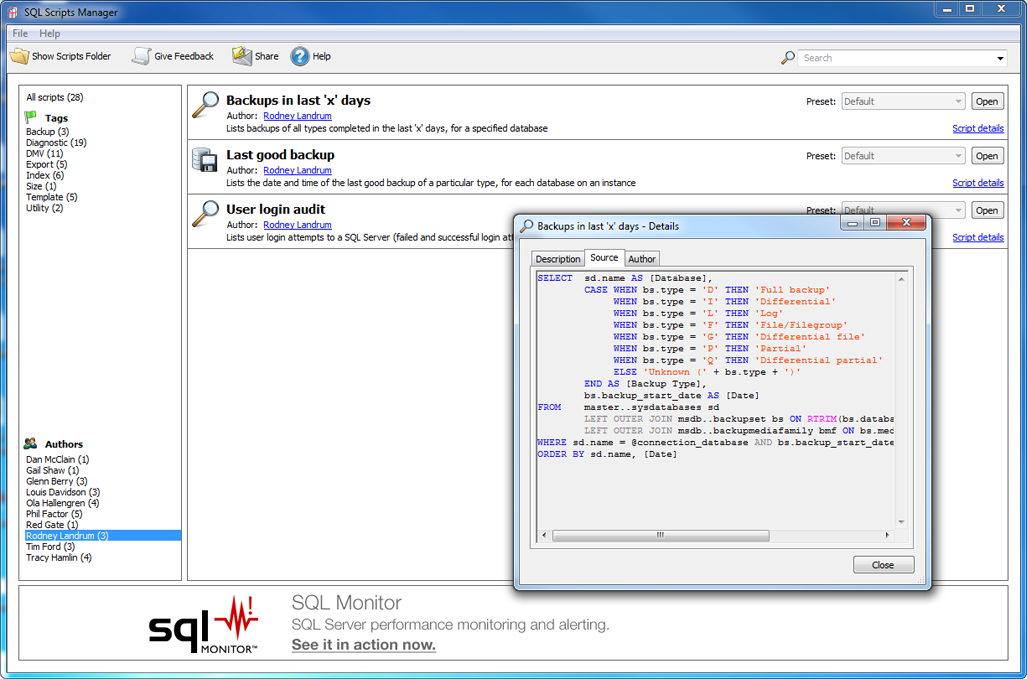
Download SQL Scripts Manager now and start benefitting from the collective wisdom of these experts – and sharing your own scripts with the SQL Server community – today.
This will be really a very useful and handy tool for DBAs.

The following are the scripts available:
- SQL FileGroup SpaceUsed
- Monitoring Plan Cache
- CPU Utilization
- IO Stalls
- Top Resource Waits
- Buffer Cache Hit Ratio
- Object Read Write Ratio
- Top Cpu Intensive Queries
- Database Backup
- Database Integrity Check
- Deploy Maintenance Scripts
- Index Maintenance
- CallProc Template
- InsertInto Template
- Select From Table
- Table Valued Function Template
- Update Templates
- Ping
- Full And Log Backups In Past X Days
- Last Good Database Backup
- Read Error Logs The DBA Way
- Blocking Transactions
- Investigating Fragmented Indexes
- Who Is Running What
- Get Hit Ratio
- Get Partitioned DBs
- Get Tables With No Clustered Index
- Get Version And Uptime
Tuesday, December 21, 2010
SQL Server 2005 Top 10 Features for Database Administration
| Feature | Description |
| Database Mirroring | Extend log shipping capabilities with the database mirroring solution. You will be able to use database mirroring to enhance availability of your SQL Server systems by setting up automatic failover to a standby server. |
| Online Restore | With SQL Server 2005, database administrators are able to perform a restore operation while an instance of SQL Server is running. Online restore improves the availability of SQL Server because only the data being restored is unavailable; the rest of the database remains online and available. |
| Online Indexing Operations | The online index option allows concurrent modifications (updates, deletes, and inserts) to the underlying table or clustered index data and any associated indexes during index data definition language (DDL) execution. For example, while a clustered index is being rebuilt, you can continue to make updates to the underlying data and perform queries against the data. |
| Fast Recovery | A new faster recovery option improves availability of SQL Server databases. Administrators can reconnect to a recovering database after the transaction log has been rolled forward. |
| Standards-based Information Access | Any object, data source, or business intelligence component can be exposed using standards-based protocols such as SOAP and HTTP—eliminating the need for a middle-tier listener, such as IIS, to access a Web services interface that is exposed by SQL Server 2005. |
| SQL Server Management Studio | SQL Server 2005 includes SQL Server Management Studio, a new integrated suite of management tools with the functionality to develop, deploy, and troubleshoot SQL Server databases, as well as enhancements to previous functionality. |
| Dedicated Administrator Connection | SQL Server 2005 provides a dedicated administrator connection that administrators can use to access a running server even if the server is locked or otherwise unavailable. This capability enables administrators to troubleshoot problems on a server by executing diagnostic functions or Transact-SQL statements. |
| Snapshot Isolation | Snapshot Isolation (SI) level is provided at the database level. With SI, users can access the last committed row using a transitionally consistent view of the database. This capability provides greater scalability. |
| Data Partitioning | Data partitioning is enhanced with native table and index partitioning that enables efficient manageability of large tables and indexes. |
| Replication Enhancements | For distributed databases, SQL Server 2005 provides comprehensive schema change (DDL) replication, next-generation monitoring capabilities, built in replication from Oracle to SQL Server, merge replication over https, and significant merge replication scalability and performance improvements. Additionally, the peer-to-peer transactional replication feature improves support for data scale out using replication. |
SQL Server 2005 Top 10 Features for Development
| Feature | Description |
| Hosted CommonLanguage Runtime | With SQL Server 2005 developers can create database objects using familiar languages such as Microsoft Visual C# .NET and Microsoft Visual Basic .NET. Developers can also create two new objects—user-defined types and aggregates. |
| Native XML Support | Native XML data can be stored, queried, and indexed in a SQL Server database—allowing developers to build new classes of connected applications around Web services and across any platform or device. |
| ADO.NET version 2.0 | From new support for SQL Types to Multiple Active Result Sets (MARS), ADO.NET in SQL Server 2005 evolves dataset access and manipulation to achieve greater scalability and flexibility. |
| Security Enhancements | The security model in SQL Server 2005 separate users from objects, provides fine-grain access, and enables greater control of data access. Additionally, all system tables are implemented as views, providing more control over database system objects. |
| Transact-SQL Enhancements | SQL Server 2005 provides new language capabilities for developing scalable database applications. These enhancements include error handling, recursive query capabilities, relational operator PIVOT, APPLY, ROW_NUMBER and other row ranking functions, and more. |
| Reliable Messaging for Asynchronous Applications | Service Broker is a robust messaging infrastructure that provides reliable transactional delivery of critical messages between servers—with the scalable high-performance that is expected with asynchronous queuing. |
| Visual Studio Integration | Tight integration with Microsoft Visual Studio and the .NET Framework streamlines development and debugging of data-driven applications. Developers can build database objects, such as stored procedures, using any .NET language and can seamlessly debug across .NET and Transact-SQL (TSQL) languages. |
| Web Services | With SQL Server 2005 developers can develop Web services in the database tier, making SQL Server a hypertext transfer protocol (HTTP) listener and providing a new type of data access capability for Web services-centric applications. |
| Embedded Reports | Use client-side reporting controls to embed real-time reports into an application at design time. |
| Full-Text Search Enhancements | SQL Server 2005 supports rich, full-text search applications. Cataloging capabilities provide greater flexibility over what is cataloged. Query performance and scalability have been improved dramatically, and new management tools provide greater insight into the full-text implementation. |
Monday, December 13, 2010
Questions on SQL JOINS
A join will allow us to view data from related tables in a single result set.
INNER JOIN:
OUTER JOIN:
LEFT OUTER JOIN:
RIGHT OUTER JOIN:
FULL OUTER JOIN:
CROSS JOIN:
Using the above tables, try to answer the following questions.
Questions:
1. What will be output of following query?
(A) 1, 2, 3, NULL, NULL, NULL
(B) 1, 2, 3
(C) NULL, NULL, NULL
(D) 0 Rows
2. What will be output of following query?
SELECT A.* from A left outer join B on A.ID=B.ID
(A) 1, 2, 3, NULL, NULL, NULL
(B) 1, 2, 3
(C) NULL, NULL, NULL
(D) 4, 5, 6
3. What will be output of following query?
(A) 1, 2, 3, NULL, NULL, NULL
(B) 1, 2, 3
(C) NULL, NULL, NULL
(D) 4, 5, 6
4. What will be output of following query?
(A) 1, 2, 3, NULL, NULL, NULL
(B) 1, 2, 3
(C) NULL, NULL, NULL
(D) 4, 5, 6
5. What will be output of following query?
(A) 1, 2, 3, NULL, NULL, NULL
(B) 1, 2, 3
(C) NULL, NULL, NULL
(D) 1, 2, 3, 1, 2, 3, 1, 2, 3
Show Answers:
INNER JOIN:
- In an inner join, Only rows with values satisfying the join condition in the common column are displayed.
- It is default join. So 'INNER' keyword can be ignored.
OUTER JOIN:
- In an outer join, rows are returned even when there are no matches through the JOIN criteria on the second table.
- Outer join is of three types: Left, Right, Full outer joins
LEFT OUTER JOIN:
- A left outer join or a left join returns results from the table mentioned on the left of the JOIN keyword irrespective of whether it finds matches or not.
- If the ON clause matches 0 records from table on the right, it will still return a row in the result—but with NULL in each column.
RIGHT OUTER JOIN:
- A right outer join or a right join returns results from the table mentioned on the right of the JOIN keyword irrespective of whether it finds matches or not.
- If the ON clause matches 0 records from table on the left, it will still return a row in the result—but with NULL in each column.
FULL OUTER JOIN:
- A full outer join will combine results of both left and right outer join. Hence the records from both tables will be displayed with a NULL for missing matches from either of the tables.
CROSS JOIN:
- A cross join also known as cartesian product between two tables joins each row from one table with each row of the other table.
- A cross join does not include 'on' clause.
CREATE TABLE A (ID numeric)
INSERT INTO A VALUES(1)
INSERT INTO A VALUES(2)
INSERT INTO A VALUES(3)
CREATE TABLE B (ID numeric)
INSERT INTO B VALUES(4)
INSERT INTO B VALUES(5)
INSERT INTO B VALUES(6)Using the above tables, try to answer the following questions.
Questions:
1. What will be output of following query?
SELECT A.* from A inner join B on A.ID=B.ID
(A) 1, 2, 3, NULL, NULL, NULL
(B) 1, 2, 3
(C) NULL, NULL, NULL
(D) 0 Rows
2. What will be output of following query?
SELECT A.* from A left outer join B on A.ID=B.ID
(A) 1, 2, 3, NULL, NULL, NULL
(B) 1, 2, 3
(C) NULL, NULL, NULL
(D) 4, 5, 6
3. What will be output of following query?
SELECT A.* from A right outer join B on A.ID=B.ID
(A) 1, 2, 3, NULL, NULL, NULL
(B) 1, 2, 3
(C) NULL, NULL, NULL
(D) 4, 5, 6
4. What will be output of following query?
SELECT A.* from A full outer join B on A.ID=B.ID
(A) 1, 2, 3, NULL, NULL, NULL
(B) 1, 2, 3
(C) NULL, NULL, NULL
(D) 4, 5, 6
5. What will be output of following query?
SELECT A.* from A cross join B
(A) 1, 2, 3, NULL, NULL, NULL
(B) 1, 2, 3
(C) NULL, NULL, NULL
(D) 1, 2, 3, 1, 2, 3, 1, 2, 3
Show Answers:
Tuesday, December 7, 2010
Questions on Choosing an Authentication Mode
When you install SQL Server 2005, the database engine can be set to any of two types of Authentication modes, Windows Authentication mode and Mixed mode.
Windows Authentication Mode:
Mixed Authentication Mode:
If Windows Authentication mode is selected during installation, the sa login is disabled. If you later change authentication mode to Mixed mode, the sa login remains disabled. To enable the sa login:
Execute the following statements to enable the sa password and assign a password.
ALTER LOGIN sa ENABLE;
GO
ALTER LOGIN sa WITH PASSWORD = '';
GO
Adhering to Password Policies:
To ensure SQL login security, SQL Server 2005 lets you to use AD's password policy and password complexity. You can do the following.
Passwords entered on the Authentication page must meet strong password policy requirements. Strong passwords are not readily guessed by any one, and are not easily hacked by using a computer program.
Follow these guidelines when you set passwords:
1. Strong passwords cannot use prohibited conditions or terms, including:
2. A strong password cannot use the following terms associated with the installation computer:
3. A strong password must be at least six characters in length and satisfy at least three of the following four criteria:
Questions:
1. You are tasked to implement a password policy for users connecting to your database. You must also provide access to non-windows clients. Which authentication modes you will use?
(a) Windows Authentication mode.
(b) Mixed Authentication mode.
2. Which of the following are true when talking about SQL Server 2005 password policies?
(a) You can force password policies.
(b) You can use password complexity.
(c) You can force password expiration.
(d) You can force users to change their password at next logon.
Show Answers:
Windows Authentication Mode:
- It is default authentication mode.
- It provides high level of security.
- It mandates that only users who are previously authenticated to windows OS can connect to SQL Server.
Mixed Authentication Mode:
- Client applications submits user name and password to connect to SQL Server.
- When using 'Mixed mode' you can use either 'Windows authentication' or 'SQL Server authentication' to connect to SQL Server.
- Non-windows users (unix, macintosh) use this mode.
If Windows Authentication mode is selected during installation, the sa login is disabled. If you later change authentication mode to Mixed mode, the sa login remains disabled. To enable the sa login:
Execute the following statements to enable the sa password and assign a password.
ALTER LOGIN sa ENABLE;
GO
ALTER LOGIN sa WITH PASSWORD = '';
GO
Adhering to Password Policies:
To ensure SQL login security, SQL Server 2005 lets you to use AD's password policy and password complexity. You can do the following.
- You can force password policies.
- You can use password complexity.
- You can force password expiration.
- You can force users to change their password at next logon.
Passwords entered on the Authentication page must meet strong password policy requirements. Strong passwords are not readily guessed by any one, and are not easily hacked by using a computer program.
Follow these guidelines when you set passwords:
1. Strong passwords cannot use prohibited conditions or terms, including:
- A blank or NULL condition
- "Password"
- "Admin"
- "Administrator"
- "sa"
- "sysadmin"
2. A strong password cannot use the following terms associated with the installation computer:
- The name of the user currently logged onto the computer.
- The computer name.
3. A strong password must be at least six characters in length and satisfy at least three of the following four criteria:
- It must contain uppercase letters.
- It must contain lowercase letters.
- It must contain numbers.
- It must contain non-alphanumeric characters – e.g., #, %, or ^.
Questions:
1. You are tasked to implement a password policy for users connecting to your database. You must also provide access to non-windows clients. Which authentication modes you will use?
(a) Windows Authentication mode.
(b) Mixed Authentication mode.
2. Which of the following are true when talking about SQL Server 2005 password policies?
(a) You can force password policies.
(b) You can use password complexity.
(c) You can force password expiration.
(d) You can force users to change their password at next logon.
Show Answers:
Questions on Default, Named and Multiple instances
SQL Server 2005 supports to have multiple instances on a single server. Each instance within a computer runs independently of other instances. You can have only one default instance and others are named instances.
Named instances are the names that we provide during installation. You can have many number of named instances on a single computer.
For example, if your computer hostname is MCITP and you are providing a name "certification" during installation, then all clients will connect to this instance with MCITP\certification as server name.
Following points are to be considered when creating a named instance.
By default, the first time you install SQL Server 2005 on a computer, Setup specifies the installation as the default instance; however, you can choose to install SQL Server as a named instance without installing the default instance first.
The following table shows the number of instances supported for each instance in the different editions of SQL Server 2005.
It is important point to consider that all components (SSAS/SSIS) of SQL Server that share the same instance name must have same version, edition, platform (16 bit/32 bit) and language.
Questions:
B. 2
C. 3
D. 4
Show Answers:
When can I use multiple instance?
- When testing multiple versions of SQL Server on same computer.
- When testing service packs and development databases and applications.
During SQL Server installation, the setup acquires the hostname of the server. So you can have only one default instance on a computer. All clients can connect to the instance using the hostname of the computer.
What are Named Instances?Named instances are the names that we provide during installation. You can have many number of named instances on a single computer.
For example, if your computer hostname is MCITP and you are providing a name "certification" during installation, then all clients will connect to this instance with MCITP\certification as server name.
Following points are to be considered when creating a named instance.
- Instance names are not case sensitive.
- Instance names are limited to 16 characters.
- Instance names cannot contain the terms "Default," "MSSQLServer," or other reserved keywords.
- The first character in the instance name must be a letter or an underscore (_).
- Subsequent characters can be letters defined by the Unicode Standard 2.0, decimal numbers from Basic Latin or other national scripts, the dollar sign ($), or an underscore (_).
- Embedded spaces or other special characters are not allowed in instance names; nor are the backslash (\), comma (,), colon (:), semi-colon (;), single quote ('), ampersand (&), or at sign (@).
By default, the first time you install SQL Server 2005 on a computer, Setup specifies the installation as the default instance; however, you can choose to install SQL Server as a named instance without installing the default instance first.
The following table shows the number of instances supported for each instance in the different editions of SQL Server 2005.
SQL Server 2005 edition | Database Engine instances | Analysis Services instances | Reporting Services instances |
Enterprise Edition Developer Edition | 50 | 50 | 50 |
Standard Edition Workgroup Edition Express Edition | 16 | 16 | 16 |
It is important point to consider that all components (SSAS/SSIS) of SQL Server that share the same instance name must have same version, edition, platform (16 bit/32 bit) and language.
Questions:
1. How many default instances you can have on a single SQL Server?
A. 1B. 2
C. 3
D. 4
Show Answers:
Sunday, December 5, 2010
Simple Questions on SQL Server Editions
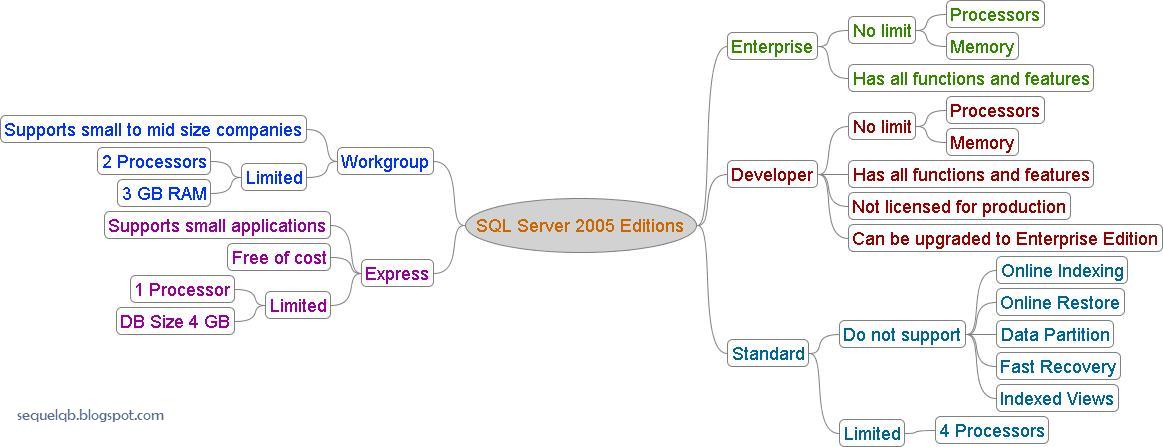
SQL Server 2005 installation requirements may differ depending on your application needs.
The different editions of SQL Server 2005 have the unique performance, price requirements and will suit for different scenarios. It is your responsibility to decide among editions of SQL Server 2005 before you install.
This image can help you understand how to make the best choice among the editions and components available in SQL Server 2005.
Questions:
1. Which of the following editions of SQL Server 2005 can support Indexed Views? Choose all that apply.
(A) Enterprise Edition
(B) Developer Edition
(C) Standard Edition
(D) Workgroup Edition
(E) Express Edition
2. You have given a Server with Windows 2003 operating system, 4 processors and 3 GB of RAM. What editions of SQL Server 2005 will you install on the server? Choose all that apply.
(A) Enterprise Edition
(B) Developer Edition
(C) Standard Edition
(D) Workgroup Edition
(E) Express Edition
3. Your customer requests you to develop a small web application to record walk-in interview details. Your will develop the application along with a small database and to be shipped to customer free of cost. Which edition of SQL Server 2005 will you choose?
(A) Enterprise Edition
(B) Developer Edition
(C) Standard Edition
(D) Workgroup Edition
(E) Express Edition
4. Which of the following editions of SQL Server 2005 NOT supported for use in a production environment?
(A) Enterprise Edition
(B) Developer Edition
(C) Standard Edition
(D) Workgroup Edition
(E) Express Edition
5. You have given a Server with Windows 2003 operating system with 8 processors. What editions of SQL Server 2005 will you install on the server that can utilize all the 8 processors?
(A) Enterprise Edition
(B) Developer Edition
(C) Standard Edition
(D) Workgroup Edition
(E) Express Edition
6. You suspect that a particular table can grow large and historical data may be archived. To do this you may implement table partitioning. Which of the following editions of SQL Server 2005 can support table partitioning?
(A) Enterprise Edition
(B) Developer Edition
(C) Standard Edition
(D) Workgroup Edition
(E) Express Edition
Show Answers:
Subscribe to:
Posts (Atom)